Technical drawing review becomes difficult when the drawing, comments, replies and current status are spread across different files and communication channels. Xenmark puts the issued PDF at the centre of one shared review so people can mark the drawing, discuss each point, track progress and continue when a revised drawing arrives.
Xenmark does not create or edit the underlying CAD or BIM design. It is the review layer around the issued PDF.
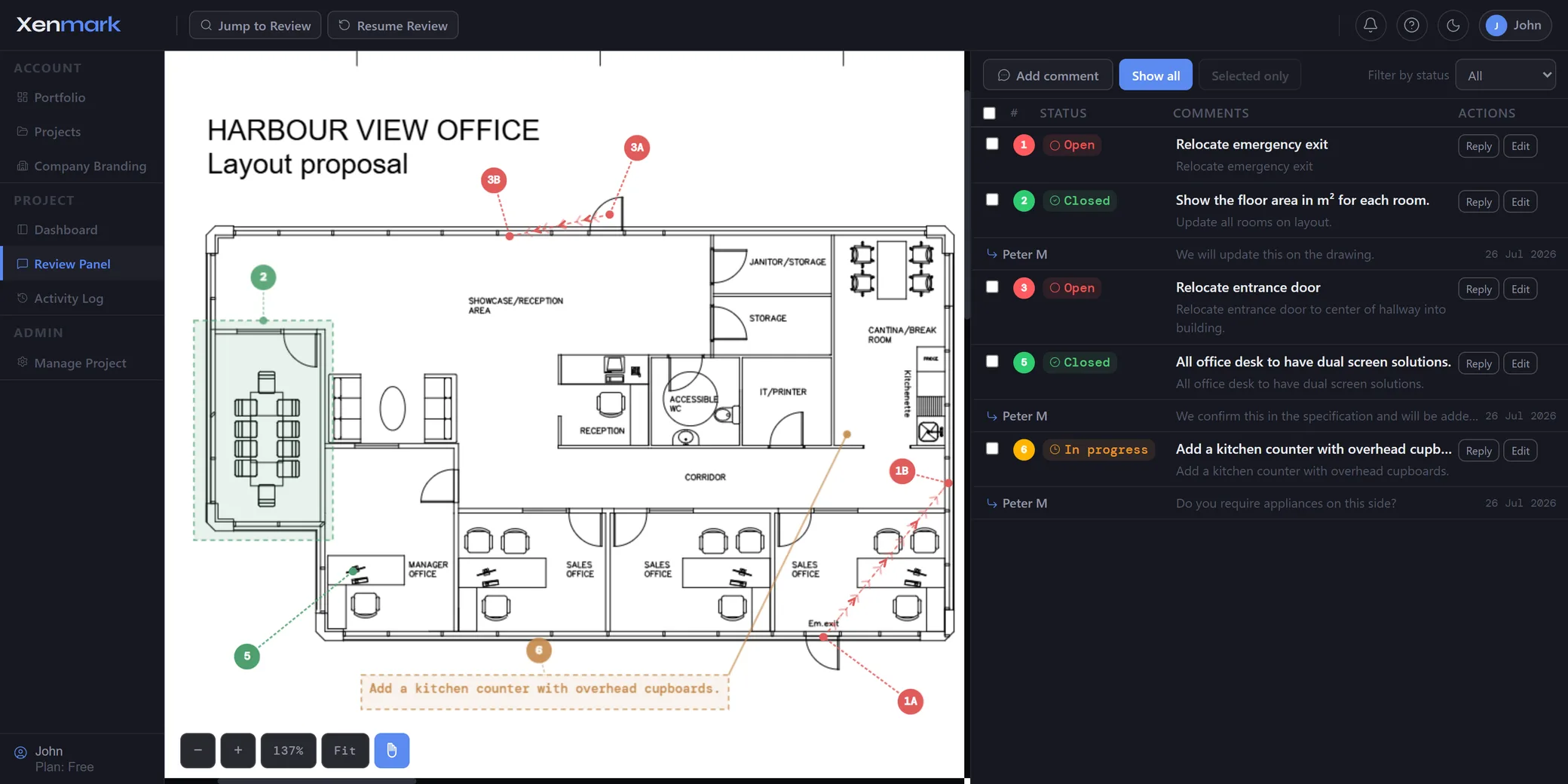
How do you review a technical PDF drawing with several people?
Upload the issued PDF to a Xenmark project and invite the people who need to take part. Reviewers can place numbered comments directly on the drawing, add visual markups where useful, reply to each issue and update its review status without making separate copies of the PDF.
That keeps four things together:
- the exact drawing location;
- the written comment;
- the discussion around the point;
- the current review state.
A reviewer does not need access to the CAD or BIM authoring environment merely to say what needs attention on the issued drawing.
Why is the drawing itself the best place to start a review comment?
A technical comment is easier to understand when the location is visible. “Check clearance” may be ambiguous in an email or spreadsheet. The same sentence beside the relevant equipment, room, detail or route is immediately more useful.
Xenmark uses numbered drawing comments so the visual location and written review item stay connected. Pin, rectangle and callout annotations can identify the point or area being discussed.
The written comment explains the issue. Replies stay with it. Status shows whether the review point is still Open, In progress or Closed.
This is the core distinction between a drawing review and a generic document discussion: spatial context matters.
What can reviewers add besides text comments?
Reviewers can use drawing markups, image attachments, @mentions, measurements and review symbols where those make the feedback clearer.
Measurements can add dimensional context after the page scale has been set. Symbols such as Check, Cross, Attention, Arrow and Cloud can add fast visual signals. An image attachment can provide supporting context inside a reply.
These tools support the review; they do not make the markup verified design information. Where a dimension, site condition or engineering conclusion requires separate verification, that process still happens outside Xenmark.
See PDF Markup and Drawing Measurement for the deeper workflows.
How do replies stay connected to the original issue?
Each comment has its own reply thread. A designer, client, contractor, supplier or other reviewer can answer the point without creating a new email chain that must later be matched back to the drawing.
That is useful when a review item takes several exchanges to resolve. The initial comment may identify a concern, a second person may ask for clarification, and a third may provide supporting information.
Keeping the discussion under the numbered drawing comment preserves the context and gives the team a stable reference such as “comment 14.”
How do you see what still needs attention?
Use the comment status to distinguish Open, In progress and Closed review items. The status does not replace technical approval or contractual document status; it simply shows where that review item currently sits in the collaborative workflow.
This becomes increasingly important as the review grows. A drawing with two comments is easy to remember. A drawing with dozens of comments from several people needs a clearer way to show which points still require work.
For the deeper lifecycle, see Drawing Comment Tracking.
What happens when Rev B or Rev C arrives?
Upload the revised PDF to the same drawing slot as a new revision. Earlier comments remain tied to the revision where they were raised, preserving the actual review history.
Xenmark does not automatically transplant those comments onto the new PDF and does not automatically decide whether the new drawing fixed them.
The reviewer checks the next revision, refers back to the earlier discussion and decides whether the point was addressed. New findings on the new revision are raised on that revision.
For the full workflow, see Revision Review.
Can external companies take part in the same drawing review?
Yes. Xenmark is browser-based and supports project roles for people inside and outside the organisation running the review. Invited reviewers do not need to buy their own Xenmark plan merely to participate in somebody else’s project.
The Project Manager controls the project. Editors can actively add review content. Participants can view, reply and export.
That makes the same review usable for clients, engineering companies, consultants, contractors, suppliers and other external parties without handing them access to the design-authoring environment.
What comes out of the review?
Xenmark can produce a Comment Plan PDF showing where numbered comments sit on the drawing and a matching Excel comment register describing the review items. Measurements and symbols are also carried into the export workflow.
When the project is closed, the team can also download a fuller archive bundle containing the project review outputs, attachments and activity history for storage on its own side.
The review remains collaborative while the result remains portable.
Does Xenmark replace CAD, BIM, DMS or formal approval?
No. Xenmark does not author or technically revise the design. It does not replace CAD, BIM, document-control or DMS systems, and it does not turn a Closed review comment into a formal approval.
Xenmark is the working review layer between drawing issue and the next controlled step.
Which kinds of drawing reviews fit this workflow?
Drawing review fits across technical sectors. Good examples include engineering drawings, construction plans, fabrication drawings, equipment arrangements, infrastructure drawings and marine drawings when the common task is the same: several people need to review an issued PDF and return structured feedback.
More specific needs have their own pages. Ship owners working on vessel drawing updates will find them under Maritime & Shipbuilding, contractors will find role-specific guidance under Teams, and anyone building an Excel register should see Drawing Comment Register.
Drawing review covers the whole review loop: drawing, comments, discussion, status, revisions and exports work better as one connected review than as separate tools.
How should a team start its first review?
Use one real drawing rather than a demonstration file. Upload the current issued PDF, invite only the people who actually need to participate, and raise the first few comments exactly where they apply.
Do not try to redesign the organisation’s entire document process on day one. Xenmark can sit between the existing drawing issue and the existing handover or approval process.
That makes the first test meaningful: the team can compare the effort of running one real review in a shared workspace with the effort normally spent collecting markups, replies and spreadsheets afterwards.