Xenmark supports the full working layer around a technical PDF drawing: put feedback on the drawing, bring the right reviewers into the same review, discuss each point, track what remains open, check the next revision, and export a portable record when the round is finished.
The Use Cases below are not separate products. They are different ways into the same drawing-review workflow. A single project may use several of them from the first markup through to final handover.
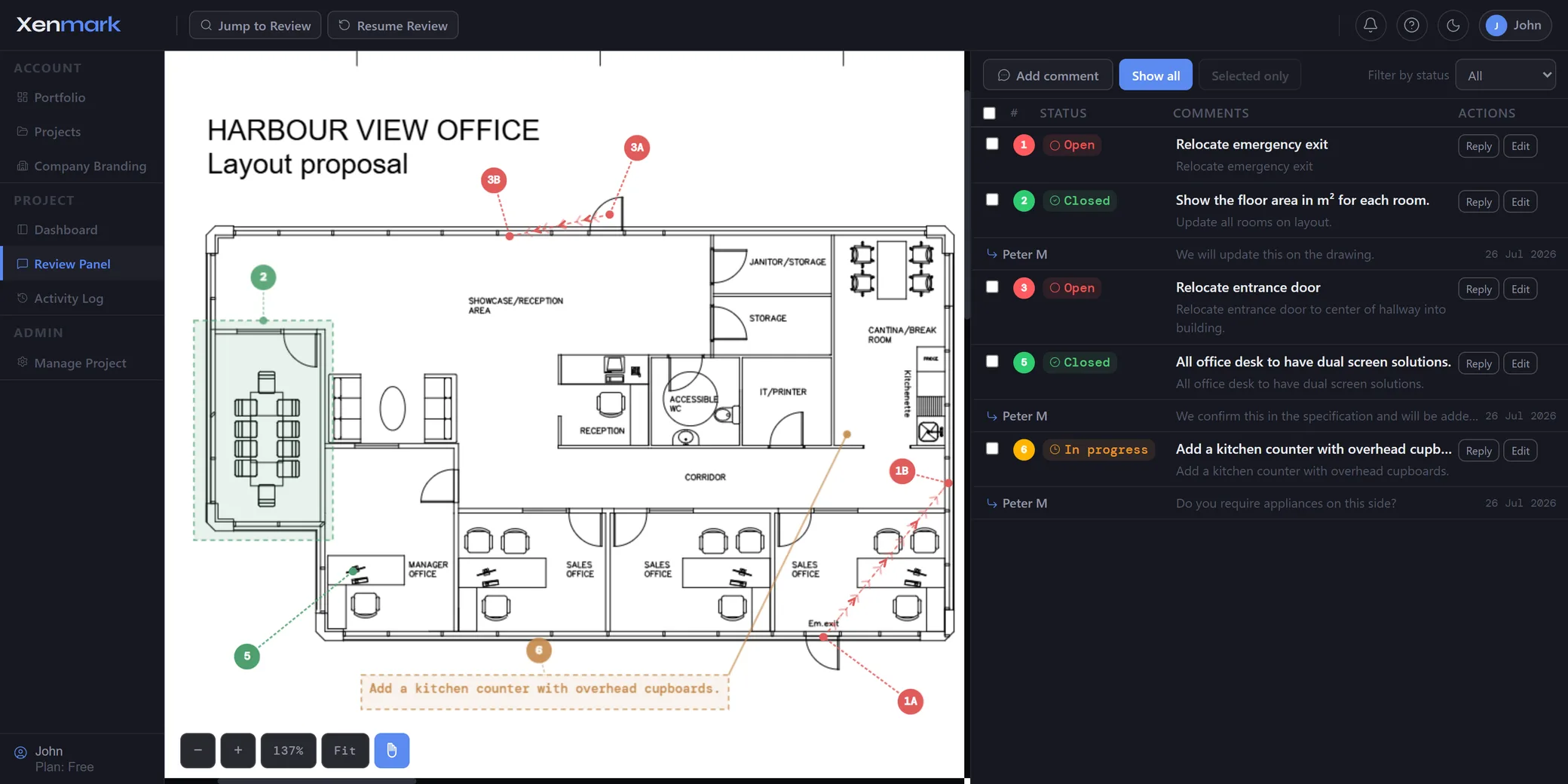
What can you do with Xenmark?
You can use Xenmark to review issued PDF drawings, mark specific locations, discuss comments with internal or external reviewers, track comment status, work through successive drawing revisions, measure directly on scaled PDFs, produce matching PDF and Excel review deliverables, and close the review with a portable local archive.
Xenmark does not replace the software that creates the drawing. The authoring team continues to work in CAD, BIM or other design tools. Xenmark is the structured review layer around the issued PDF.
Review the drawing
- Drawing Review — run the complete collaborative review around one issued PDF.
- PDF Markup — place comments, shapes, symbols and visual annotations where they apply.
- Drawing Measurement — calibrate the page scale and add dimensional context during review.
- Internal Drawing Review — work through comments with your own team before external issue.
Coordinate the people and comments
- External Drawing Review — invite clients, consultants, suppliers and other organisations.
- Drawing Comment Tracking — keep location, replies, status and revision context together.
Follow the drawing as it changes
- Revision Review — check later PDFs against earlier review history without starting over.
- Drawing Approval — organise the collaborative review before a separate acceptance or approval step.
Deliver and close the review
- Drawing Comment Register — export the numbered Excel register and matching Comment Plan PDF.
- Drawing Review Handover — close the project with deliverables, attachments and activity history in a portable archive.
- Drawing Review Integrations — read current review data from other tools or compatible AI assistants without granting write access.
How does a Xenmark review normally move from start to finish?
A typical Xenmark review follows a simple sequence:
- Upload the issued PDF. The drawing becomes the shared reference.
- Invite the reviewers. Internal and external participants join according to their role.
- Mark the drawing. Numbered comments, visual markups, measurements and symbols show exactly where feedback applies.
- Discuss each point. Replies, attachments and @mentions stay with the comment.
- Track progress. Open, In progress and Closed statuses show the current review state.
- Upload the next revision. Earlier history stays on the revision where it was created.
- Check the revised PDF. Reviewers decide whether earlier points were addressed and raise new comments where needed.
- Export the review. Produce the matching Comment Plan PDF and Excel register.
- Close and keep the record locally. Download the archive bundle into the document system your organisation already uses.
You can use Xenmark for the entire sequence or only the part that currently causes friction.
Which Use Case should you start with?
Start with Drawing Review if the problem is broad: several people need to review the same technical PDF and the current process is spread across files, email and spreadsheets.
Start with PDF Markup if the immediate problem is communicating the exact drawing location clearly.
Start with External Drawing Review if the difficulty begins when clients, consultants, contractors or suppliers join the review.
Start with Drawing Comment Tracking if the team already collects comments successfully but loses track of replies, status and what remains open.
Start with Revision Review if every new Rev B or Rev C creates another disconnected review trail.
Start with Drawing Approval if the review leads toward a formal acceptance decision that happens outside Xenmark.
Use the newer specialist pages when the need is more specific: measurement, internal review, comment registers, handover or read-only integrations.
Does Xenmark replace CAD, BIM or document control?
No. Xenmark is for collaborative review of issued PDFs. The design authoring, engineering verification, formal issue status, contractual workflows and regulated approval processes remain in the systems and organisations responsible for them.
That boundary is deliberate. It means someone can participate in a drawing review without needing access to the authoring environment, while the design team still controls the actual technical document.
Why are the Use Cases sector-neutral?
Because the same review mechanics recur across engineering, architecture, construction, manufacturing, infrastructure and maritime work. The drawings and terminology differ, but the global Use Case is still something like reviewing a PDF, resolving comments or checking a revision.
Sector-specific workflows belong under Industries. Audience-specific workflows belong under Teams / Who it’s for.
How do Use Cases connect to Industries and Teams?
Use Cases explain the reusable workflow once, then Industries and Teams add the context that changes with sector or audience.
For example, Revision Review explains the general job of checking a new drawing issue against the history of an earlier review. The Maritime & Shipbuilding cluster can then explain how that same workflow applies to vessel drawings, while the Ship Owners Team page can explain what the owner-side reviewer cares about.
Put simply: the Use Case answers how the workflow works, the Industry page answers how it applies in this sector, and the Team page answers how it fits this audience.
Every use case
Drawing Review
Review technical PDF drawings in one browser workspace with numbered comments, replies, statuses, revisions and matching PDF + Excel exports.
Explore →PDF Markup
Add numbered comments, callouts, measurements and review symbols to technical PDF drawings, then keep each markup connected to the review.
Explore →Drawing Measurement
Calibrate PDF scale, measure lengths, routes, perimeters and areas, and keep measurement markup with the drawing review and exports.
Explore →Internal Drawing Review
Review technical PDF drawings internally with numbered comments, replies, statuses and revision history before the next external issue.
Explore →External Drawing Review
Review technical PDFs with clients, consultants, contractors and suppliers in one browser workspace without per-reviewer licences.
Explore →Drawing Comment Tracking
Keep each drawing comment tied to its location, replies, status and revision so the team can see what is still open and what changed.
Explore →Revision Review
Keep review history tied to each drawing revision and check new PDF issues against earlier comments without rebuilding the review.
Explore →Drawing Approval
Collect comments, resolve review points and check revised drawings before formal acceptance or approval in the process your project requires.
Explore →Drawing Comment Register
Export a numbered Excel drawing comment register and matching Comment Plan PDF directly from the review instead of maintaining both by hand.
Explore →Drawing Review Handover
Close a drawing review with PDF and Excel deliverables, attachments and activity history in a portable archive for your own document system.
Explore →Drawing Review Integrations
Read Xenmark review data from external tools or compatible AI assistants with a read-only API that cannot change comments, drawings or status.
Explore →Looking for your sector or your role instead?
Try the whole workflow with one drawing
Start with one real PDF, invite the people who need to review it, and see which Use Cases naturally become part of the same review.