Explore Xenmark by industry
Drawings, disciplines and terminology vary by industry. The need to collect, discuss and resolve comments on one drawing does not.
Engineering
Review technical drawings with colleagues, clients, suppliers and other engineering disciplines.
Explore →Architecture
Collect and discuss feedback on plans and architectural drawings in one shared review.
Explore →Construction
Review construction drawings with project teams, consultants, contractors and other stakeholders.
Explore →Manufacturing
Review fabrication, production and equipment drawings with internal and external teams.
Explore →Maritime & Shipbuilding
Review ship drawing PDFs, coordinate vessel updates and check returned revisions with owners, yards and engineers.
Explore →Civil engineering
Review infrastructure and civil drawings across disciplines, organisations and project stages.
Explore →Different industries. A familiar review process.
A shipyard and an architecture practice do not work alike. The drawings carry different information, the disciplines involved are different, and the words people use for the same problem are different. But the shape of the review is usually recognisable across all of them: something is issued, several people have something to say about it, those comments get discussed and resolved, and a revised drawing goes back out.
Xenmark sits around that loop rather than inside any one industry's tools. It does not know what a hull section or a curtain wall is, and it does not need to — it keeps track of who said what, about which part of which drawing, against which revision, and whether it has been dealt with yet. That is the part that behaves the same way everywhere, and it is the part that usually gets handled with email and a spreadsheet.
Drawing reviews get difficult when feedback starts to spread
Reviews rarely fail on any single drawing. They get difficult when the review itself stops being in one place.
Multiple reviewers
Comments arrive from different people and different organisations, each with their own view of what matters and their own way of writing it down.
Multiple channels
Email, separate marked-up PDFs, screenshots and spreadsheets gradually become part of the same review, and no single one of them holds all of it.
Multiple revisions
A new drawing can arrive while comments raised against the previous version are still being discussed, and the two have to be kept apart.
External participants
Clients, suppliers and consultants often need to take part without being part of the internal project team, or paying for a seat to do it.
These are the recurring problems Xenmark is designed around, regardless of industry.
Keep the drawing and its review together
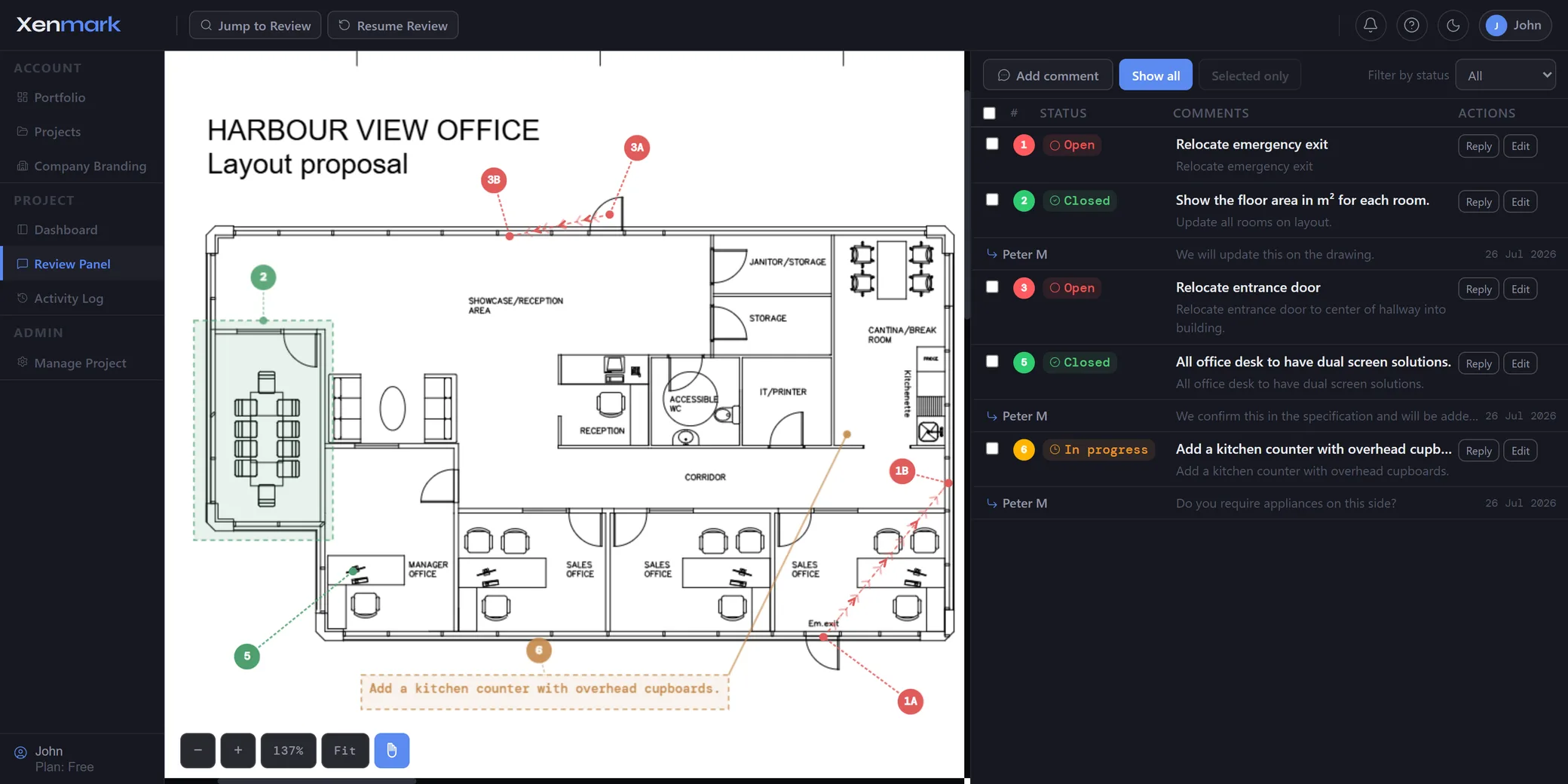
- Mark up the PDFPlace feedback exactly where it applies on the drawing, and number it.
- Discuss commentsReplies stay attached to the comment they answer, not scattered across a thread.
- Track progressEvery comment carries a status, so you can see what is still open.
- Export the reviewA comment plan PDF and an Excel comment register, numbered to match each other.
Looking for a specific workflow instead?
If you already know what you need to accomplish, explore Xenmark by use case instead.
View all use cases → Find your team →Start your next drawing review
The Free plan is enough to run a small drawing review from first comment to final export.
Start a free project