Marking a ship drawing PDF and revising a technical drawing are related, but they are different jobs. A red circle and note on an issued PDF can tell an engineer exactly where an owner observed a problem. The engineer still has to determine what the change means, update the controlled authoring file, perform the appropriate checks and issue a new drawing.
Confusing those jobs can make an apparently clear “updated PDF” hard to trust. The question is not which tool is better; it is which artifact the team needs at each step.
What is PDF markup for?
PDF markup is a communication and review layer. People can identify a drawing location, describe an observed condition, ask a question, propose an outcome or respond to another reviewer’s comment. It is particularly useful when owner representatives, crew, yards and suppliers need to contribute without using the design-authoring software.
A marked PDF can be detailed. It can include a photograph reference, equipment tag, measurement note or a sketched possible arrangement. Its purpose remains to help the responsible party evaluate the issue. Unless the project’s controlled process says otherwise, it should not be presented as the newly issued technical master.
What is CAD or design authoring for?
The responsible engineer or designer creates and changes the technical drawing or model in its authoring environment. That work may involve more than moving a symbol: interfaces, dimensions, calculations, drawing references, checking and document control can matter. The exact process depends on the organization, drawing type and project.
The resulting issued PDF is an output for review and use under the project’s document rules. It should have a clear drawing number and revision. If a formal class or flag process applies, the responsible parties handle that separately.
| Step | Typical question | Working artifact |
|---|---|---|
| Observe a vessel difference | “What differs from the issued drawing?” | Photo/field note and comment on the issued PDF |
| Clarify the request | “What does the engineer need to assess?” | Drawing-linked discussion and supporting evidence |
| Prepare technical change | “What is the correct controlled revision?” | Design-authoring files and project checks |
| Review the return | “Does this issued PDF address our points?” | New drawing revision and review record |
This is a typical communication model, not a universal workflow or allocation of legal responsibility.
Why can’t someone simply edit the PDF lines?
Changing a line on a PDF may communicate an idea, but it does not by itself establish that the line corresponds to a checked, coordinated design. A pipe route might interact with supports or access; an equipment move might affect connections or other plans. Even when the visual change appears minor, the appointed technical party must decide which controlled documents to revise and how to verify them.
Illustrative example: A superintendent draws an arrow on a machinery arrangement to show the observed position of a replacement pump. That arrow helps the engineer find the concern. The engineer asks for pump identification and connection photographs, updates the technical drawing in its authoring process, then issues Rev B. The owner reviews Rev B against the original observation. The marked Rev A and the issued Rev B are intentionally different artifacts.
Where does Xenmark fit?
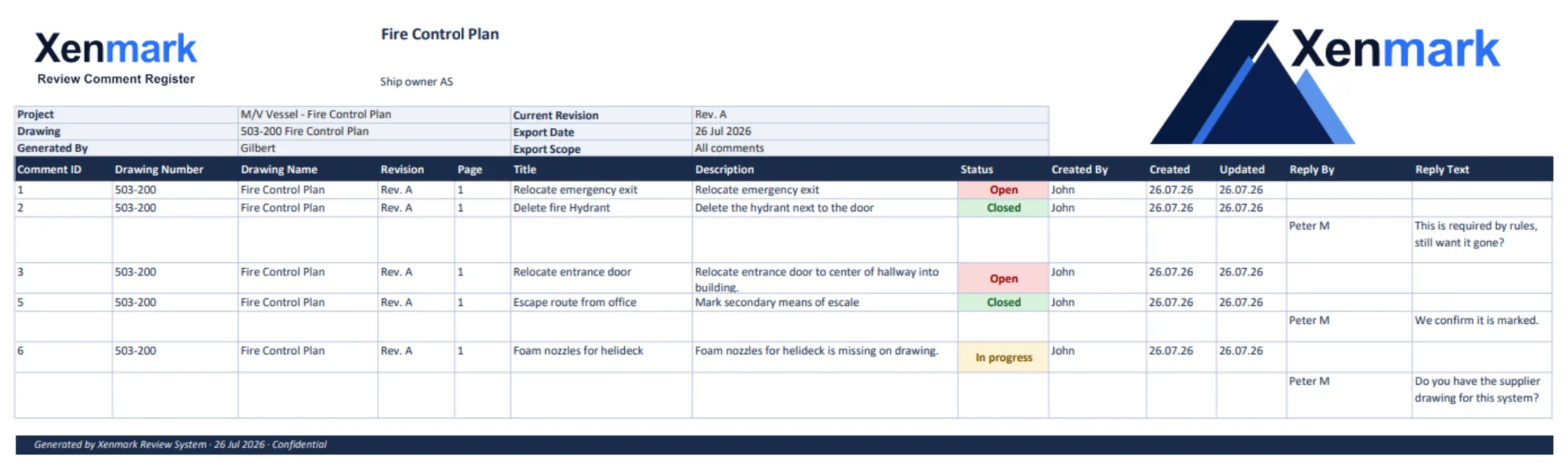
Xenmark supports the PDF review work around the technical revision: location-specific comments, replies, review statuses, later PDF revisions and a portable review record. It does not create or edit the CAD/master drawing and it does not approve a technical design. Earlier review comments remain on the original PDF revision; people evaluate the new issue.
For a vessel-side discrepancy, continue to Vessel Drawing Updates. For a multi-party drawing review, continue to Ship Drawing Review & Markup. The global PDF Markup Use Case explains the sector-neutral workflow.
The practical test for choosing a tool is therefore simple: “Are we trying to communicate and check a drawing issue, or are we responsible for authoring the controlled technical change?” A team may need both categories in sequence. Keeping the boundary clear helps reviewers ask better questions and helps designers receive better inputs.
Which file should each party ask to receive?
An owner may need the issued PDF to review and retain; a designer needs the controlled authoring material and project inputs; a yard may need both the issued drawing and installation information under its process. A marked-up PDF is often the easiest common language across those parties, but its status should be obvious. Put “review markup,” the source revision and the date on a transmittal or record so no one confuses it with a newly issued drawing.
When the engineer sends a revised PDF, check its drawing number and revision rather than relying on the attachment name. If the revised file answers only part of the request, record what remains. If it introduces a new question, raise that question on the new issue. The old marked PDF remains useful history, not a layer to paste blindly onto the new geometry.
A worked decision: pump relocation
Imagine a replacement pump installed aft of the position shown on an older machinery arrangement. The vessel side can photograph the installation, mark the pump on the issued PDF and ask whether the drawing needs updating. A supplier can provide the pump data. The engineer can check whether connections, supports, access and other drawings are affected before authoring the revision. The owner then reviews the returned PDF against the actual vessel condition. The example is illustrative and does not claim that a pump can be moved safely without additional technical review.
What changes between stages is the authority of the artifact. The annotated original records an observation and question. The CAD/master files carry the technical authoring work. The newly issued PDF communicates the revised drawing under the project’s document process. The review record says what the team checked and discussed. None of those artifacts should be mislabeled as a formal class or flag approval unless the relevant authority has actually issued it.
When is a short redline enough?
For a one-off, easily understood question, a redline and direct discussion may be efficient. As the number of reviewers, issues or revisions grows, stable comment IDs, replies and a register can make the conversation easier to follow. This is a process choice rather than a claim that every project needs a specific tool. The guide Redlines vs a Structured Comment Register for Vessel Drawing Updates compares the two methods in more detail.
Related pages
Return to Maritime & Shipbuilding for the Industry hub. Ship Drawing Review & Markup and Vessel Drawing Updates cover the practical PDF-review steps; the global PDF Markup Use Case covers the sector-neutral method. Ship Owners and Marine Engineering Companies describe the two main audiences for the handoff.