A general arrangement (GA) drawing brings together many concerns in one view. The owner may focus on operations, a yard on access and installation, a designer on the arrangement as a whole, and a supplier on the space required by equipment. Those comments are most useful when everyone knows which issued GA revision and which exact space is being discussed.
This guide is about a review conversation, not a complete method for designing or approving a GA. The project team and responsible designer decide which comments become technical changes.
Start with a controlled reference
Record the GA drawing number, title, revision, issue date and relevant deck or sheet. If the package includes related machinery, accommodation or supplier drawings, note the cross-reference rather than assuming one GA contains every needed detail. Agree which issued file is under review before people begin marking separate downloaded copies.
Invite reviewers for a reason
The useful question is not “How many people can we add?” but “Who can answer this arrangement question?” An owner representative might explain how a space will be used. A yard may flag an installation path. A supplier may identify an equipment service envelope. The designer is needed when a technical arrangement must be evaluated or changed.
Give each reviewer enough context to comment precisely. A good GA comment states the deck and space, points to the feature on the drawing, describes the concern and asks a specific question. If it depends on a clearance or equipment dimension, name the source of that information and have the responsible party verify it.
Illustrative example: An owner representative comments at an equipment-room access door: “The planned route for routine servicing appears to pass through the stored-equipment area; can the intended access route be confirmed?” A supplier replies with its service-space requirement. The yard adds that one alternative route conflicts with an installation opening. The designer then assesses options and issues a revised GA if appropriate. These roles and comments are teaching examples, not a real project.
What if comments conflict?
Keep the conflicting points visible instead of closing one because another party replied. The project needs a responsible decision maker to weigh the technical and operational constraints. Ask each party to identify the basis for its position: requirement, supplier data, site observation, preference or an assumption needing verification. Once a decision is made, capture it with the drawing issue it affects.
“Owner wants door moved” and “yard says door cannot move” are not enough on their own. A useful record says which door, on which GA revision, what each party’s constraint is, who decided the response, and whether a later issued drawing was checked.
Review the next GA issue
Earlier comments remain tied to the GA revision on which they were raised. When a new issue arrives, verify its title block and check each earlier concern on the returned PDF. Look at nearby spaces as well as the specifically changed feature; a resolved access point can affect another route or interface. Record the reviewers’ conclusions and raise new findings on the new issue.
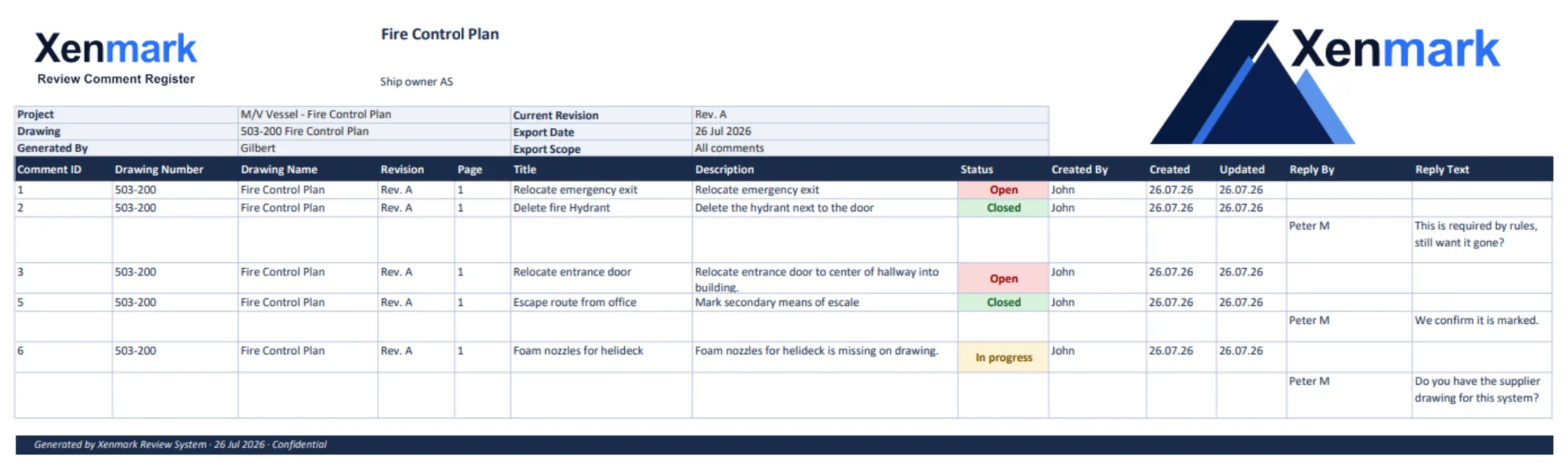
For a shared PDF review, Xenmark can place numbered comments at exact locations, keep replies with each point and provide a review record. It does not choose the arrangement or author the GA revision.
Build a comment that survives being forwarded
A GA comment should make sense to someone who did not attend the review meeting. Name the issued drawing and deck, identify the space or item, describe the observed or proposed problem, explain why it matters to the commenting party, and ask a specific question. If a comment refers to another drawing, supplier document or site measurement, include that reference and its issue. Avoid “as discussed” as the only rationale; future reviewers may not know what was discussed.
For the illustrative equipment-room access issue, a stronger comment would say: “GA-201 Rev C, Deck 4, equipment-room door D-14: the depicted access route appears to overlap the supplier’s service area on V-07 Rev 2. Please confirm the intended route and whether the GA or equipment placement will be revised.” The question is still open for design assessment, but the recipient can locate it and identify the related document.
Decide how to handle broad preferences
Not every GA comment reports an error. An owner may prefer a different circulation route or room arrangement. Record that as a preference or requested change, not as an observed defect or mandatory requirement. The responsible project party can then evaluate cost, schedule, technical consequences and contractual scope through its own process. A shared review can preserve the request and answer without pretending that every preference must be accepted.
When comments affect several spaces, it may be better to create separate points for each location and one short summary describing the common issue. A single giant markup across multiple decks is difficult to assign and close. Cross-reference the related points so reviewers can understand the wider concern.
Keep the decision linked to the next issue
After a conflict is resolved, record who made the decision and which constraints were considered. When a new GA arrives, compare the revised access or layout to that decision. If the drawing still conflicts with a supplier reference, raise a new question against the current issue. If the designer deliberately retained the original arrangement, keep the documented rationale instead of repeatedly treating the same preference as an unanswered technical defect.
This is where a GA review becomes more than visual markup. It is a sequence of observations, preferences, constraints, decisions and checked issued drawings. Xenmark can hold the PDF-linked conversation; the project’s responsible people still make and authorize the arrangement decisions.
For the broader issued-drawing workflow, see Ship Drawing Review & Markup. For package rounds in a newbuild, see Newbuild Drawing Review.
The simplified GA example here illustrates how a precise comment, a conflict and a decision can travel across an issued revision. It is not a real approved vessel arrangement. On a project, use the controlled drawing and the responsible designer’s decision record.
A useful GA review can end with a short decision record: issue raised, evidence considered, decision maker, resulting drawing revision and who will check the next issue. That record is particularly helpful when an owner’s preference is considered but not adopted. It explains what happened without implying that a preference was a defect or that a Closed comment is formal approval.
Related pages
Return to Maritime & Shipbuilding for the Industry hub. Ship Drawing Review & Markup covers the general workflow; Newbuild Drawing Review covers package rounds. The global External Drawing Review Use Case explains multi-party review, while Shipyards, Marine Engineering Companies and Equipment Suppliers / Marine Vendors show the relevant Team roles.