Marine engineering companies often receive the difficult middle step in a drawing update: the vessel or owner knows something has changed, but the engineer must turn that observation into a technically controlled drawing revision. Xenmark helps structure the review information around that handoff without trying to replace the engineering tools used to make the revision.
How does Xenmark make owner drawing comments easier to interpret?
Xenmark places each numbered comment directly on the location in the issued PDF that the reviewer is talking about. The engineering company receives the written comment together with the visual location, rather than having to interpret a spreadsheet row or email description in isolation.
That is particularly useful for operating-vessel updates where the owner or superintendent may be reporting what appears to differ onboard. The comment can identify the item, location and observed change, while measurements or an image attachment can provide supporting context where useful.
The observation is not verified design data. The engineering company still evaluates the information, decides what must be checked, and prepares the technical revision in its normal CAD or naval-architecture environment.
How can an engineer ask clarification questions on the exact drawing point?
Reply directly to the numbered comment. The clarification then remains attached to the location and issue that caused the question, so the owner, superintendent or yard can answer without starting a parallel conversation.
For example, if the comment says that equipment has moved, the engineer can ask for the deck, frame, orientation, measured distance or an onboard image in the same thread. When the answer arrives, the context is preserved.
This does not remove the need for engineering judgement or additional verification. It makes the information exchange more structured and gives both sides a shared reference such as “comment 14” rather than “the item mentioned in yesterday’s email.”
How does the engineering company return the revised drawing?
The engineer prepares the technical revision in the engineering software already used by the company. When the revised drawing is issued as a PDF, it can be uploaded into the same Xenmark drawing slot as the next revision for review.
Earlier comments remain on the revision where they were raised. The owner or other reviewers can refer back to the earlier history while checking the new PDF, but Xenmark does not automatically copy the old comments onto the new revision or decide whether they have been resolved.
That separation is important: Xenmark manages the review trail; the engineering company manages the technical drawing revision.
Can engineering companies use Xenmark for owner and yard reviews beyond vessel updates?
Yes. The same model works for newbuild, refit, conversion and supplier-interface reviews where several external parties need to comment on issued drawing PDFs. The Project Manager can invite the relevant participants and decide who may raise comments and who should only reply and export.
For an engineering company, this can provide a consistent review surface even when the reviewers do not use the same CAD or document-management environment.
Examples include:
- owner comments on arrangement drawings;
- clarification during modification design;
- shipyard responses to owner comments;
- supplier questions around equipment interfaces;
- internal coordination before a formal class submission.
The official document-control and approval processes remain in their required systems.
How does the PDF and Excel comment register help the engineering team?
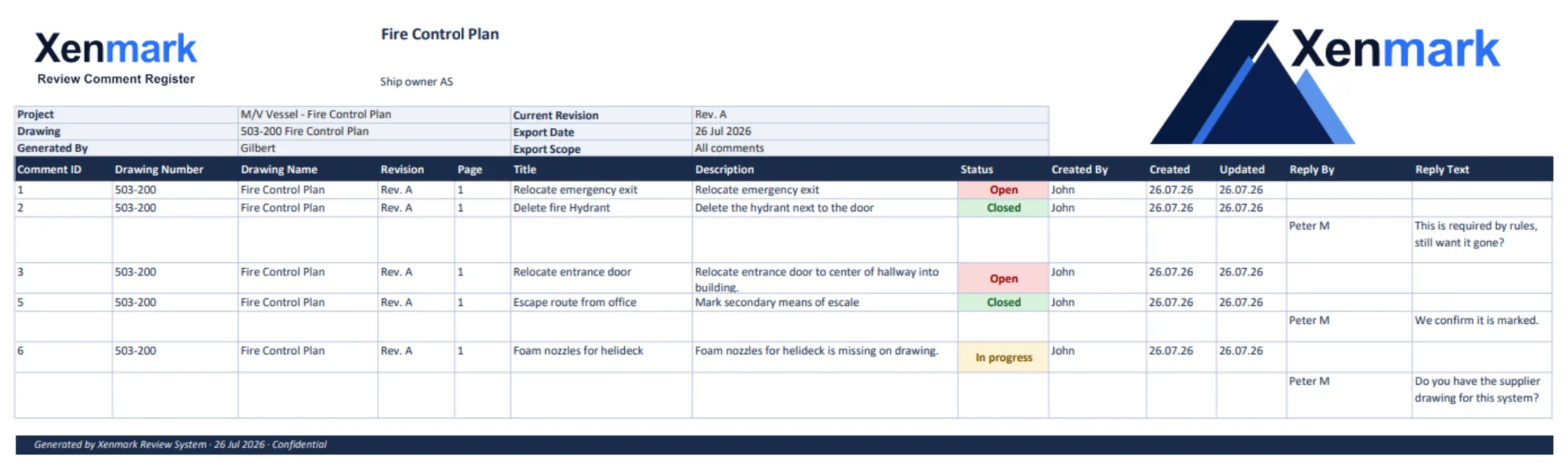
Xenmark can export a marked-up comment-plan PDF and an Excel register with matching comment numbers. The engineer can use the PDF to see where each point sits and the register to work through the written list, replies and statuses.
This is useful when a customer expects a traditional comment sheet but the review itself is carried out on the drawing. The export turns the same review into both a visual and tabular deliverable without maintaining two unrelated numbering systems.
The register should still be treated as a review record or working comment list, not as a formal class approval document.
See Maritime Drawing Comment Register.
Does Xenmark replace CAD, PLM or document-control software for engineers?
No. Xenmark does not create or edit the engineering drawing. It does not replace CAD, naval-architecture software, PLM/PDM systems, the engineering company’s controlled document process or the classification society’s submission environment.
Its role is narrower: let the people checking an issued PDF place and discuss structured comments, then let the engineering team return the revised PDF for another review round.
That can be useful precisely because external reviewers do not need access to the engineering authoring environment. They review the issued PDF while the engineering company retains control of the actual design work.
How should an engineering company handle class or flag comments in Xenmark?
Use Xenmark only as an internal coordination layer if that is useful to the team. Official class, flag or statutory comments and responses should remain in the formal system required for that process.
The team may record a working copy of a point against the relevant drawing location to coordinate who needs to answer it or what the next revision should address, but Xenmark does not determine compliance, submit the drawing or issue approval.
For that boundary, see Pre-Class Internal Drawing Review; Xenmark is not a class-review platform.
What is the value of inviting the owner directly into the review?
It keeps the question and answer close to the drawing. Instead of the engineering team receiving a marked-up PDF, replying by email, waiting for another screenshot, and then reconstructing the full history later, each review point can keep its discussion and status in one place.
Invited reviewers join free and do not need their own paid plan. That makes it practical for an owner, shipyard or supplier to participate in the same review when the Project Manager wants them involved.
Xenmark is for reviewing and coordinating issued PDF drawings. It does not replace the CAD or naval-architecture software used to create the design, and it does not perform class, flag, statutory or formal regulatory approval.